

VentroTap™
What is VentroTap™?
VentroTap™ is a built-in NFC chip embedded inside every Ventro wallet. It lets you share your contact details with anyone — instantly, wirelessly, and without any app or subscription.
Think of it as your digital business card. Tap. Share. Done.
No app needed
No subscription
Free forever
NFC technology
Near Field Communication — the same technology used in contactless bank card payments. It's been in smartphones for years. VentroTap™ uses it to share your contact, not payment data.
Built into your wallet
The NFC chip is permanently embedded inside the wallet — no sticker, no case, no add-on. It's part of the product from the factory. You can't lose it or remove it.
Your digital identity
Name, phone, email, social media, website — you choose what to display. You control your profile from your Ventro customer account. Update it anytime, as many times as you want.
Tk 0 — free for life
Many NFC wallets charge a monthly or yearly subscription to keep your profile active. VentroTap™ is yours permanently — no recurring fees, ever. Pay once for the wallet. That's it.
How It Works?

Tap Your Wallet
Hold your wallet near any NFC-enabled smartphone.
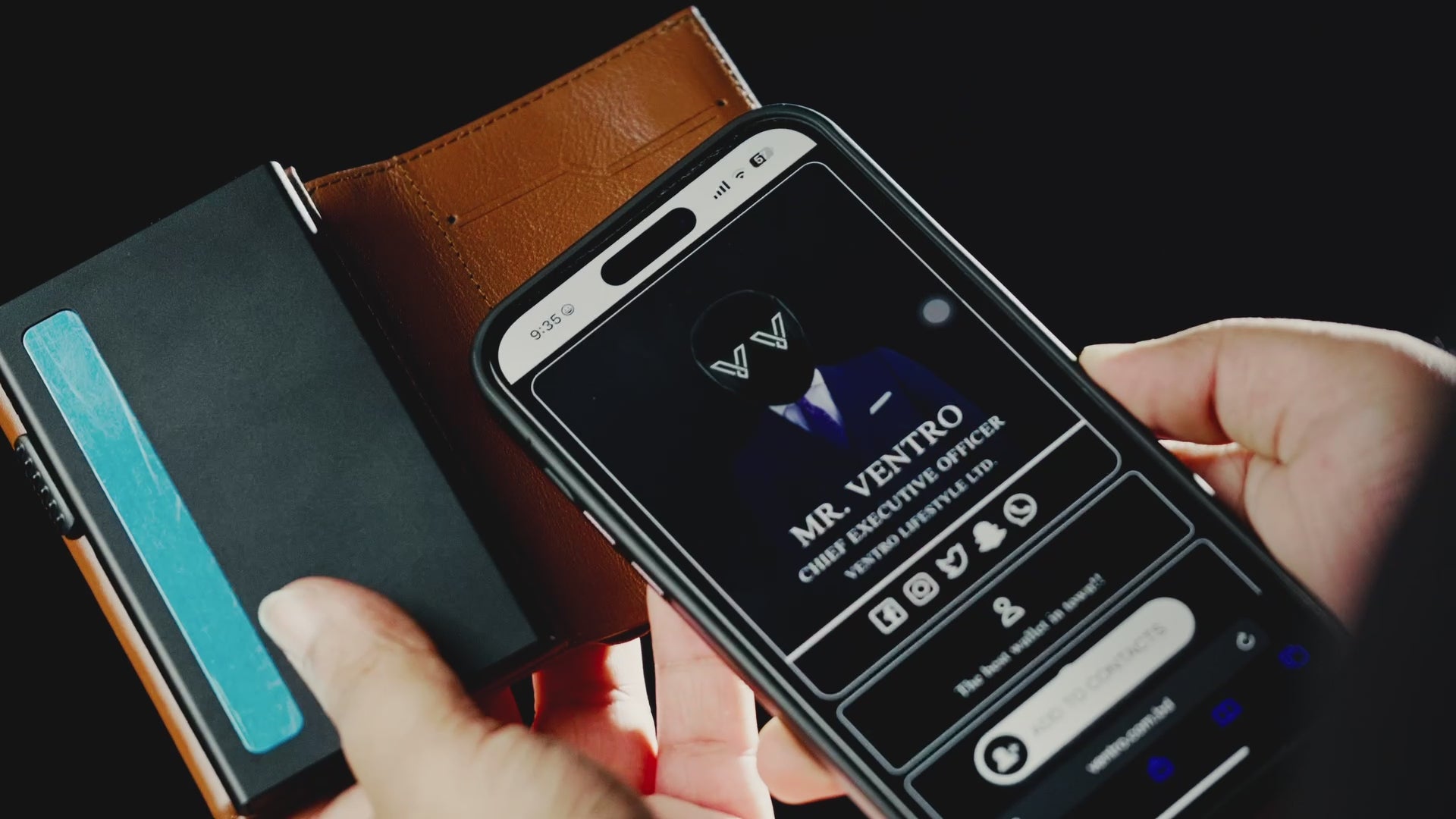
Instant Access
Your profile link opens directly in their browser.
Step by step
How does it work?
Tap the VentroTap™ logo
Hold the other person's phone near the VentroTap™ logo on your wallet. A light tap is all it takes — no pressure needed.
Their screen shows your profile
Within 1–2 seconds a notification or link appears on their screen. Your contact page opens in their browser — no app, no download.
They save what they want
They can save your number, email, follow your Instagram — whatever you've chosen to show. Done in seconds. No app required on their end ever.
Compatibility
Works on Android & iPhone
Android
Any Android with NFC (most phones from 2017+)
Enable NFC in Settings → Connected Devices
Works with screen on or off (most devices)
Phone NFC antenna: centre or top of back panel
iPhone
iPhone 7 and above with iOS 14+
NFC always on — no settings needed
Screen must be on (lock screen or unlocked)
Phone NFC antenna: top edge of iPhone — tap wallet logo to the top
Where to tap
Where is the NFC chip in the wallet?
NFC chip here
VENTRO
Tap zone = VentroTap™ logo on your wallet
Light tap — not a swipe
Hold the phone steady over the logo for 1–2 seconds
Takes 1–2 seconds
If it doesn't work, try adjusting the phone position slightly
Remove thick cases
Very thick phone cases may reduce NFC range — try removing if not responding
Pricing
Any subscription fees?
Tk 0
per month
Free forever. No recurring fees.
Other NFC based visiting cards
Tk 300–800 /month
Profile deactivates if you stop paying
VentroTap™
Tk 0 forever
Built in. Works for life. Pay once for the wallet.
Your profile
How do I update my contact information?
Your VentroTap™ profile is linked to your Ventro customer account. You can update your information anytime — what people see when they tap your wallet updates instantly, no hardware change needed.
1
Log in with your purchase email
Go to ventro.com.bd and log in to your customer account using the same email address you used when you purchased your Ventro wallet. This is how your account is linked to your specific NFC chip.
Must use your purchase email — this is how the chip knows which profile to show
2
Go to your VentroTap™ profile
Inside your account, find the VentroTap™ section. This is where you manage everything that appears on your public contact page when someone taps your wallet.
3
Edit and save your details
Update any information you want — name, phone, email, WhatsApp, Instagram, LinkedIn, website, or a custom message. Save the changes and they go live immediately.
What you can display
Full name
Phone number
Email address
WhatsApp number
Instagram handle
LinkedIn profile
Website / portfolio
Custom message or title
Updates go live instantly
The moment you save, anyone who taps your wallet will see the new version. No delays, no waiting.
Unlimited updates
Change jobs? New number? Update as often as you want — there's no limit and no charge per update.
Use your purchase email
Your NFC chip is registered to the email used at purchase. If you can't log in, contact us on WhatsApp with your order number and we'll help you recover access.